KineMaster is a powerful mobile video editing app designed to help creators produce high-quality social media videos directly on phones and tablets. It is widely used by content creators publishing on YouTube, TikTok, Instagram, and Facebook.
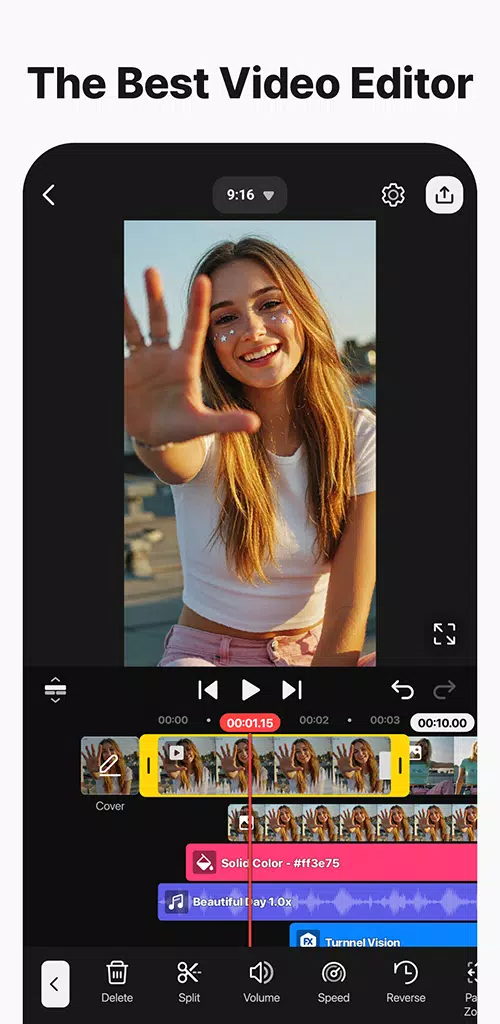
KineMaster focuses on fast, precise mobile editing by offering a full-screen timeline, touch-friendly controls, and professional-grade tools. With AI-assisted features, ready-made templates, and built-in assets, creators can move from recording to publishing without switching devices. High-resolution exports and cloud backup ensure projects stay accessible across multiple devices.
You can download the KineMaster APK latest version from guruapk to start editing videos with a mobile-first workflow.
KineMaster App Features
Start Quickly with Templates and Mix Community
KineMaster provides thousands of ready-made templates that you can preview, apply, and customize. Simply replace the clips, text, and music, then publish your video.
Additionally:
- You can share your own templates with the Mix community
- Reusable templates help speed up future projects
- Ideal for intros, reels, shorts, and branded content
AI Tools for Captions, Voice, and Cleanup
KineMaster includes advanced AI tools that automate common editing tasks, such as:
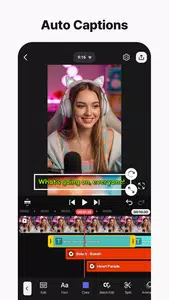
- Auto captions generation
- Text-to-speech with AI voices
- Magic background removal
- Noise reduction and vocal separation
- AI tracking and video upscaling
These tools help creators achieve clean and professional results with minimal effort.
Precise Video Editing Controls

For users who need detailed control, KineMaster offers:
- Keyframe animation for motion and effects
- Chroma key support for green screen videos
- Speed control and reverse playback
- Advanced color adjustments per clip
- Built-in color filters for a consistent visual style
Full Mobile Timeline Workflow
The multi-layer timeline is optimized for mobile editing:
- Magnetic guides for easy alignment
- Portrait and landscape editing support
- Full-screen preview for accurate framing
- Multiple undo and redo options
This workflow allows creators to experiment freely without risk.
Built-in Asset Store

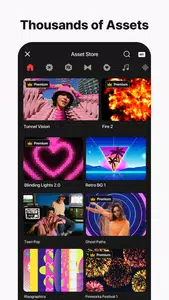
The KineMaster Asset Store includes:
- Effects and transitions
- Stickers and fonts
- Music tracks and sound effects
- Stock videos and images
Assets can be searched, filtered, and added directly to your project, making editing faster and more creative.
Export Options and Cross-Device Editing
KineMaster supports high-quality exports, including:
- Up to 4K resolution at 60 FPS
- Social-media-ready export presets
- Transparent background export for motion graphics
With KineCloud, projects can be backed up and accessed across devices, allowing seamless editing when switching phones or tablets.
KineMaster Pricing and Watermark Information
The free version of KineMaster includes:
- Advertisements
- A small watermark on exported videos
KineMaster Premium offers:
- Removal of ads and watermark
- 10 GB of KineCloud storage
- Access to Spring Premium as part of the same subscription
KineMaster on PC and Laptop
KineMaster does not offer an official Windows or macOS version. Some users run the Android app on a computer using an emulator, but this method is not officially supported.
For the best experience:
- Edit and export on a phone or tablet
- If using an emulator, download the KineMaster APK latest version from guruapk at your own discretion
Mix Community and KineCloud
The Mix community allows creators to share reusable templates built from their edits. This is useful for maintaining brand consistency, intros, lower thirds, and recurring formats.
KineCloud keeps project files synced across devices, enabling creators to start editing on one device and finish on another without manually transferring files.
How to Edit a Video in KineMaster

Follow these basic steps to create a video using KineMaster:
- Open KineMaster, tap New Project, select an aspect ratio, and name your project
- Import videos and photos from your device gallery
- Arrange clips in the timeline and trim or split as needed
- Add text, stickers, transitions, and background music
- Apply color adjustments or AI captions
- Preview in full screen and export using a social preset or 4K at 60 FPS
Download KineMaster APK and Start Editing
KineMaster delivers a fast, flexible, and professional mobile video editing experience. It is easy to learn and powerful enough for consistent content publishing on social media.
👉 Download KineMaster APK latest version from guruapk and start creating high-quality videos directly from your phone.
Official Resources and Support
- Official Website: https://www.kinemaster.com/
- Support Email: support@kinemaster.com
Frequently Asked Questions (FAQs)
Is KineMaster free to use?
Yes, KineMaster is free to use with ads and a watermark. The Premium version removes ads and the watermark and includes cloud storage.
How do I remove the KineMaster watermark?
The watermark is removed by subscribing to KineMaster Premium. There is no official way to remove it in the free version.
Is there an official KineMaster app for PC?
No, KineMaster does not provide a native PC version. Using an emulator is possible but not officially supported
Additional APP Information
Additional App Information
Latest Version:
8.0.14.36002.GP
Uploaded By:
Adam Elghazery
Android Requirement:
Android 8.0 and above
License:
Required
Category:
Free Video Players & Editors
Content Rating:
Rated for Everyone
Report:
Flag as inappropriate
Frequently Asked Questions (FAQ)
What is KineMaster?
KineMaster is a professional mobile video editing app that allows users to create high-quality videos using advanced tools, templates, and AI-powered features directly on Android devices.
Is KineMaster free to use?
Yes, KineMaster is free to download and use. However, the free version includes ads and adds a watermark to exported videos. To remove ads and the watermark, users need to subscribe to KineMaster Premium.
How can I remove the KineMaster watermark?
The watermark can only be removed by purchasing a KineMaster Premium subscription. There is no official or legal way to remove the watermark in the free version.
What Android version is required for KineMaster?
KineMaster requires Android 8.0 or higher to run smoothly on your device.
Does KineMaster support 4K video export?
Yes, KineMaster supports video export up to 4K resolution at 60 FPS, depending on your device’s hardware capabilities.
Can I use KineMaster on a PC or laptop?
KineMaster does not have an official Windows or macOS version. Some users run the Android app on a PC using an emulator, but this method is not officially supported.
Does KineMaster include templates?
Yes, KineMaster offers thousands of ready-made templates through its Mix community, allowing users to quickly create videos by replacing clips, text, and music.
Are AI features available in KineMaster?
Yes, KineMaster includes AI-powered tools such as auto captions, text-to-speech, background removal, noise reduction, and AI tracking to simplify editing tasks.
Is KineMaster safe to use?
Yes, KineMaster is a legitimate and widely used video editing app. For security reasons, always download the app from trusted sources and avoid modified versions.
Who should use KineMaster?
KineMaster is ideal for:
- YouTubers
- TikTok and Instagram creators
- Vloggers
- Social media marketers
- Beginners and professional editors